Error found "Internal Errors 0x4000" in Mid flight

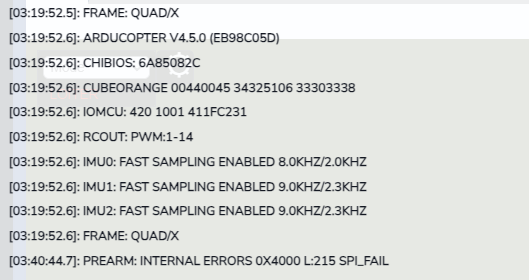
I am encountering the error message “Internal Errors 0x4000” during mid-flight, and after landing it shows:

“PreArm: Internal errors 0x4000 l:215 spi_fail.”

What is the root cause of this SPI failure error?

First try updating to latest stable firmware, 4.6.3 at this time, and see if the error persists.
Do you have any devices connected to an SPI connector?

Hi @xfacta
We have locked and validated ArduPilot firmware version v4.5.0 in our GCS, and we are not using any external SPI devices in the current setup.
Hi Shivam,

Noting this problem has been reported in multiple places, let’s consolidate into this forum thread. Particularly, there are important details in this issue that we will refer to here.

There are two primary issues identified:

  • IOMCU reset
  • SPI failure detected

After reviewing the logs provided, and the posts in the issue referenced above incl. Randy’s advice, I recommend that you:

  1. Run an endurance bench test (~48 hours) and monitor for the problem

  2. Regardless of bench test result, update to latest release Copter-4.6.3

  3. Run endurance bench test again

  4. If the problem occurs, remove peripherals (RC, telemetry radio, etc.) and run the test again. If the problem does not occur, run an endurance flight test at low altitude.

Record all the findings and report back.

If the problem persists, try moving ESC outputs from MAIN pins to AUX pins (bypassing the IOMCU) and testing again. Note this won’t help find the root cause, but should prevent the loss of control of the ESCs due to IOMCU timeout.

To answer the following questions we received:

1. What are the known root causes of iomcu_reset, spi_fail, IMU fast FIFO reset, and related internal errors?

iomcu_reset is caused by a timeout (no comms with IOMCU for over 1 second). spi_fail indicates a communication timeout with peripheral/s on the SPI bus (likely IMU0, judging by the msg 5 seconds afterward “IMU0 fast fifo reset 1”). We need more information to determine root cause.

  1. Are these issues associated with hardware, firmware, power supply stability, EMI/EMC, vibration, temperature, or manufacturing defects?

There are a variety of potential causes. We can’t rule out any of the above yet.

  1. Are there any diagnostic procedures or hardware tests that can confirm the root cause?

Potentially, but we haven’t narrowed down the problem enough yet.

  1. Is there any recommended firmware version, configuration, or hardware modification that can reduce or eliminate these failures?

There are some changes in more recent ArduCopter versions that could have an effect here. I understand you are currently tied to 4.5.0 but please work on updating to 4.6.3. Also, as suggested above, moving ESCs to the AUX pins to bypass the IOMCU issue (using MAIN pins is normally recommended and safer, except in this case of an IOMCU issue specifically).

Hi @Mish ,

Thanks for reaching out.

As per your recommendation, we will plan for a 48-hour test, although it will take some time to complete.

We have a few additional questions:

  • If we switch the ESC outputs from the MAIN outputs to the AUX outputs (bypassing the IOMCU), is there any possibility of overloading the FMU or causing any issues with the FMU processor?

  • If you need any additional information to help determine the root cause, please let us know. If it is possible for us to provide the required data or perform additional tests, we will be happy to do so.

Thanks.

Hi Shivam,

The FMU load won’t increase significantly and has plenty of overhead in the CubeOrange.

I recommend testing the ESC timeout failsafe on the bench without props, especially if moving over to AUX pins. Arm and spin the motors, then perform a ‘Preflight_Reboot_Shutdown’ through the Mission Planner ‘Actions’ tab. Ensure all motors stop spinning. If they keep spinning, don’t fly it. This is unlikely to be an issue on any modern ESC but is always worth testing!

I’ll let you know if we think of anything else to send us or test.