Here4 Blue not detected by OpenDroneID app

Problem: by all appearances, my Here4 Blue is configured correctly, I am able to pass prearm checks with DID_OPTIONS=1, I get no errors or warnings, and the drone flies. However, at no point does the Here4 Blue appear on the apps OpenDroneID or Drone Scanner. The app versions of both were refreshed.

Ardupilot 4.6.3 on Cube Orange+

Here4 Blue attached via droneCAN with firmware version 1.14.D42D3330

Herelink controller and air unit

I’m using a custom GCS software. The ODID messages it sends are:

OPEN_DRONE_ID_SYSTEM at 1 Hz:
target_system = 13
target_component = 0
id_or_mac = empty
operator_location_type = 1
classification_type = 0
operator_latitude = a valid, normal number in deg e7
operator_longitude = a valid, normal number in deg e7
area_count = 1
area_radius = 0
area_ceiling = 0
area_floor = 0
category_eu = 0
class_eu = 0
operator_altitude_geo = -1000
timestamp = 32 bit Unix Timestamp in seconds since 00:00:00 01/01/2019.

OPEN_DRONE_ID_OPERATOR_ID at 1 Hz:
target_system = 13
target_component = 0
id_or_mac = empty
operator_id_type = 0
operator_id = 7346321 (not the actual number, but same number of digits and non-zero)

OPEN_DRONE_ID_BASIC_ID at 1 Hz:
target_system = 13
target_component = 0
id_or_mac = empty
id_type = 1
ua_type = 2
uas_id = SN012

The values of the messages are hardcoded and do not change. That is a temporary state while the software is finished. As said before, the RID doesn’t send any messages back that complain about these values, and it passed prearm checks with the RID prearm checks enabled. It also worked with QGC-herelink, but I had to use a fixed GCS location. I don’t know why it doesn’t work with

It seems notable to me that I don’t have more parameters available for the Cube ID portion of the here4 blue.

Yes, I followed the instructions for setting up the CubeID. They weren’t very helpful.

Is there further documentation available for what exactly is required to get the Here4 Blue to transmit?

params.zip (7.0 KB)
You haven’t read or followed the instructions.

I’m assuming I’m missing something, otherwise it would work. If you see something that ques you into the conclusion that I haven’t read the instructions, please point it out so I can fix it.

I have read those instructions. I built the ODID bootloader and firmware version using that exact video. The parameters are what is specified, excepting that the article uses UA_type=1 for a plane and I am using a copter. I’ve tried MP, too. The only part of that I’m missing is using SITL, which it says is an avenue for testing, not a prereq. I’ve also read the Cube pilot setup instructions for Cube ID, which is what is referenced from the Here4 Blue’s documentation.

I even re-read that webpage before responding here, just to make sure there wasn’t something I was obviously missing.

Is it required to use the locking feature, IE setting DID_OPTIONS=5 and then sending OPEN_DRONE_ID_BASIC_ID, to actually get it to transmit?

I have kept it at 1 to avoid locking because the vehicle is currently still a work in progress. I can lock it, but that is not clearly indicated as a prerequisite for transmission.

From ardupilot/libraries/AP_HAL_ChibiOS/hwdef/CubeOrange-ODID/defaults.parm:

If setting persistent UAS ID at first reception of Basic ID from OEM’s config tool

set the DID_OPTIONS to 5 , otherwise set to 1. At first reception of Basic ID, the

UAS ID, Type, and UA Type will be set to the value in the Basic ID message and DID_OPTIONS

will be set to 1.

Hi James-Michael,

I may be wrong, but one thing I would check first is whether
the RID module is receiving a valid OPEN_DRONE_ID_LOCATION stream, not only
BASIC_ID / OPERATOR_ID / SYSTEM.

From the MAVLink OpenDroneID message set, BASIC_ID
identifies the UA, SYSTEM carries operator/system information, but LOCATION is
the message that carries the UA position/altitude/speed/heading and is normally
expected at about 1 Hz. If your custom GCS/route is only sending BASIC_ID,
OPERATOR_ID, and SYSTEM, the pre-arm check may pass while the actual broadcast
may still not be considered complete/visible by receiver apps.

A few diagnostic checks that may help narrow it down:

1. In Mission Planner Drone ID tab, does the Remote ID
status box show RID Comms healthy, UAS ID populated, and valid GCS GPS/operator
location?

2. Is OPEN_DRONE_ID_LOCATION present at 1 Hz on the MAVLink
stream going toward the autopilot/RID path?

3. Is your custom GCS sending a HEARTBEAT as MAV_TYPE_GCS?
The MAVLink OpenDroneID routing notes mention that RID components use the GCS
heartbeat/sysid to identify GCS-originated ODID messages.

4. For testing, it may be worth trying target_system=0 and
target_component=0 temporarily, since the MAVLink OpenDroneID guide says ODID
messages are normally broadcast with target fields set to zero unless targeting
a specific RID component.

5. Regarding DID_OPTIONS=5 / persistent ID locking: I do not
think the documentation clearly states that locking is required merely to
transmit. My understanding is that locking/persistent UAS ID is more for
manufacturer/compliance/tamper-resistance workflow. But I would be interested
if CubePilot/ArduPilot can confirm whether Here4 Blue specifically requires
that step before it starts BLE/Wi-Fi advertising.

Also, since it worked with QGC/Herelink using a fixed GCS
location, comparing the exact MAVLink ODID messages from QGC versus the custom
GCS would probably reveal the difference quickly.

Regards,

Dr. Fares Al-Dhaheri

Al-Etihad Industrials, UAE

I used a python script to emulate a GCS GPS so I can use a PC to run mission planner, taking the herelink and custom software out of the equation. This is “emulator dif position.py” that is in the attached zip.

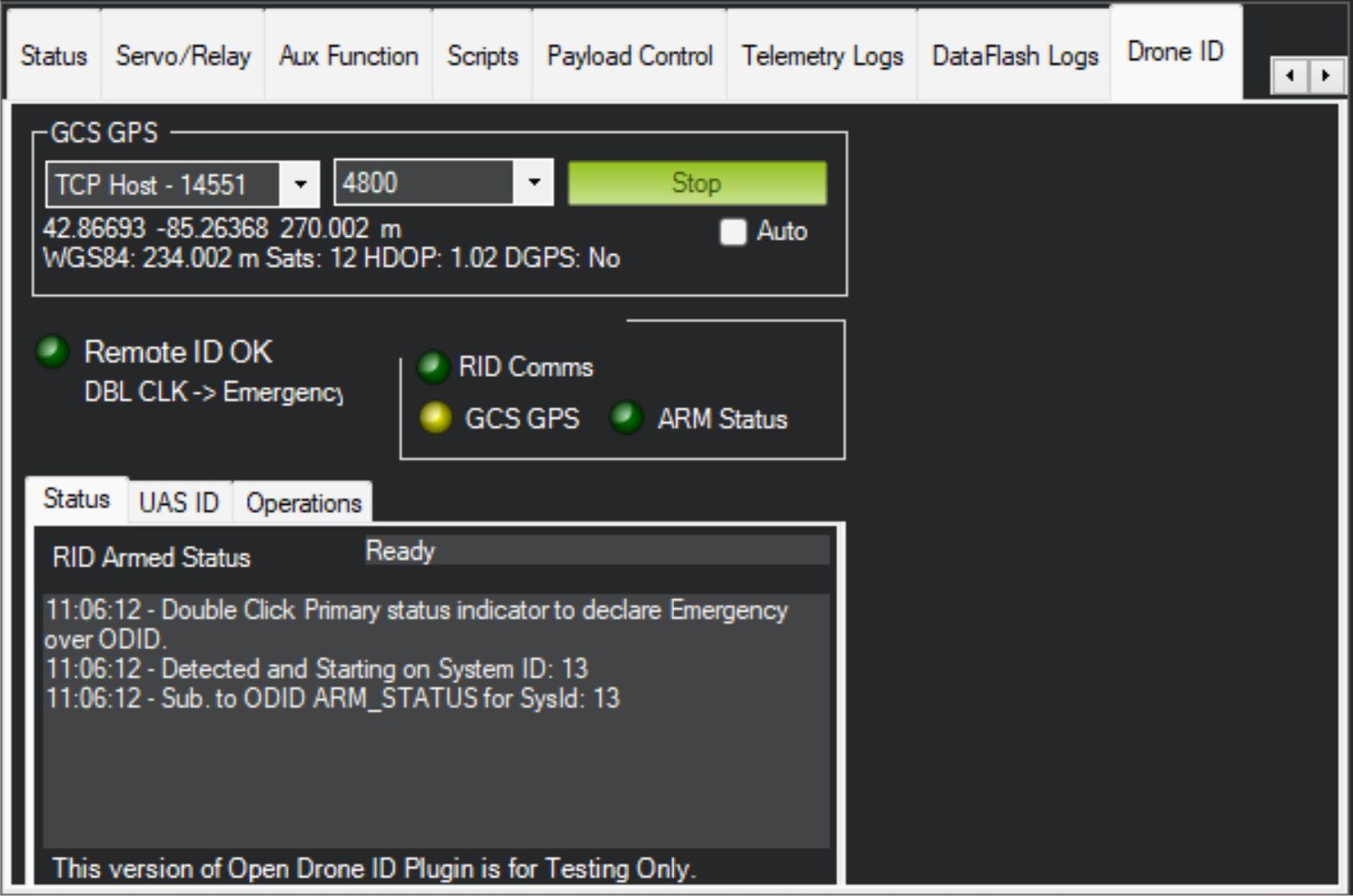
In mission planner RID tab (pictures of the other views are in the attached zip):
RemoteID OK
RID comms green
GCS GPS yellow (should this be green?)
ARM status green

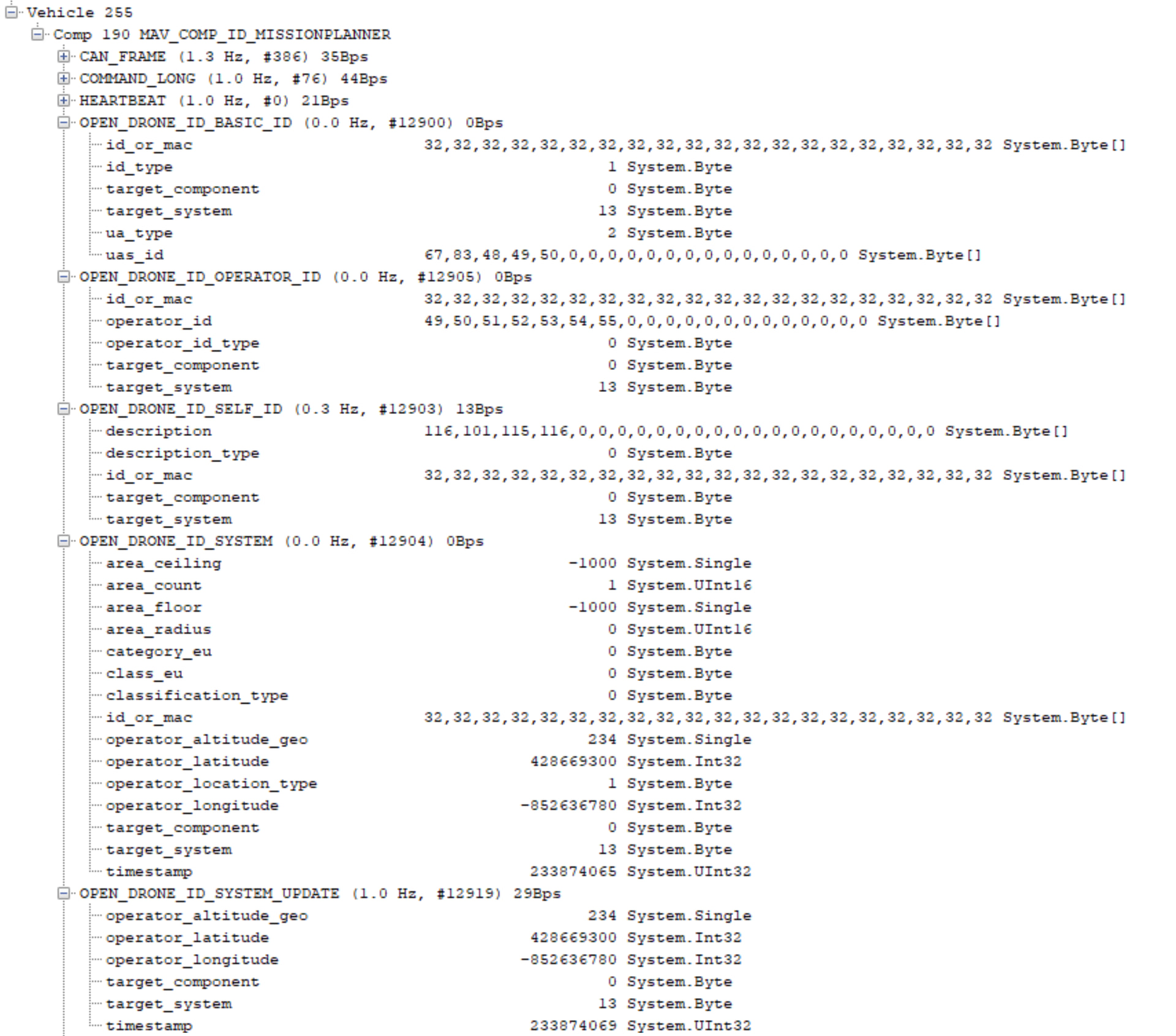
I connected to mission planner > mavlink inspector > OPEN_DRONE_ID_ARM_STATUS appeared with 0 status and payload (ready to arm). See the mavlink screenshot for the DID mavlink messages.


Mission planner’s outgoing traffic includes:
COMMAND_LONG
HEARTBEAT
OPEN_DRONE_ID_BASIC_ID
OPEN_DRONE_ID_OPERATOR_ID
OPEN_DRONE_ID_SELF_ID
OPEN_DRONE_ID_SYSTEM
OPEN_DRONE_ID_SYSTEM_UPDATE
REQUEST_DATA_STREAM
TIMESYNC
After filling in the information for MP’s remoteID tab (in screenshots MP RID connection with spoofed GCS GPS_1-3), the contents of the OPEN_DRONE_ID_BASIC_ID parameters are filled with values that seem reasonable.

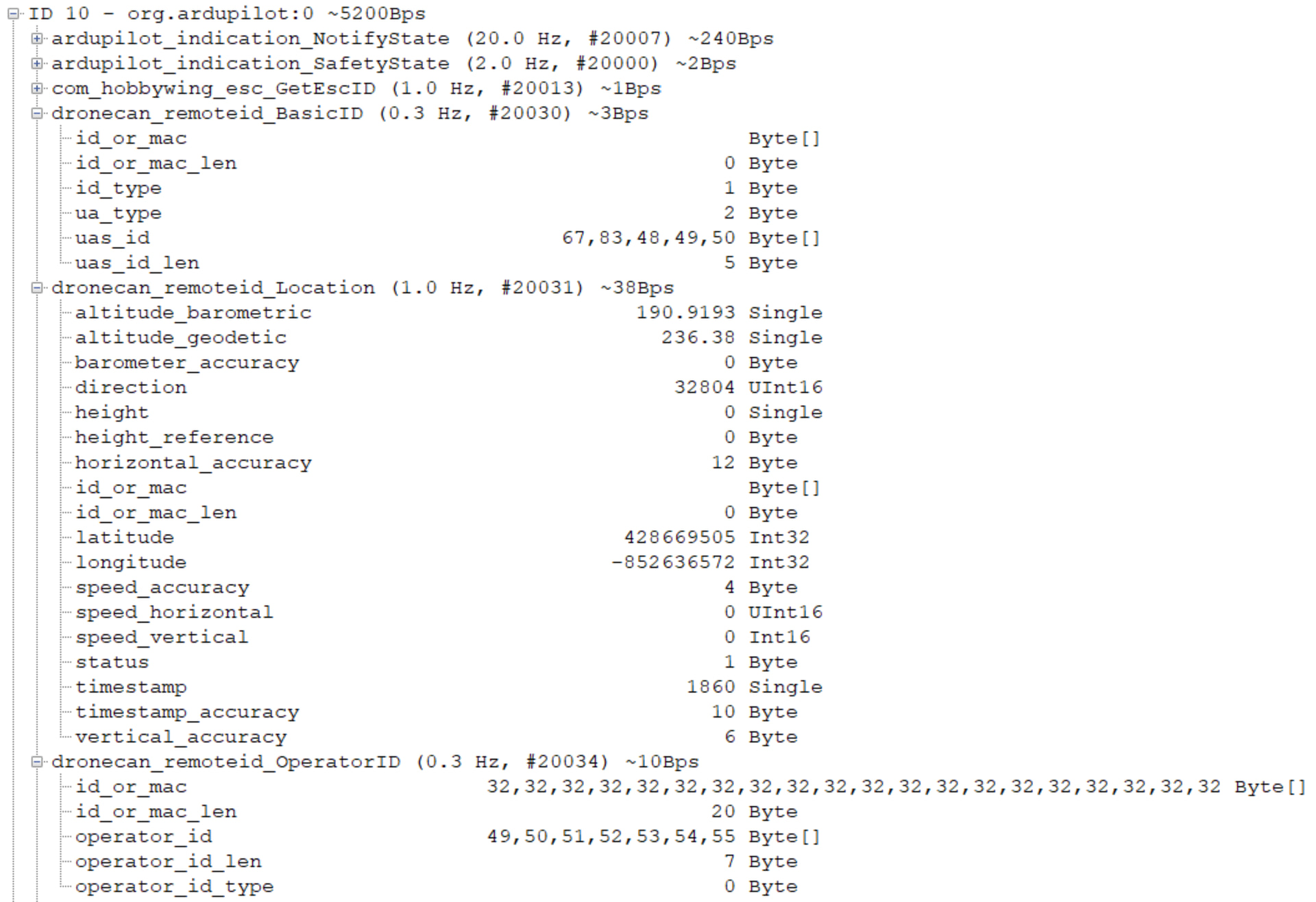
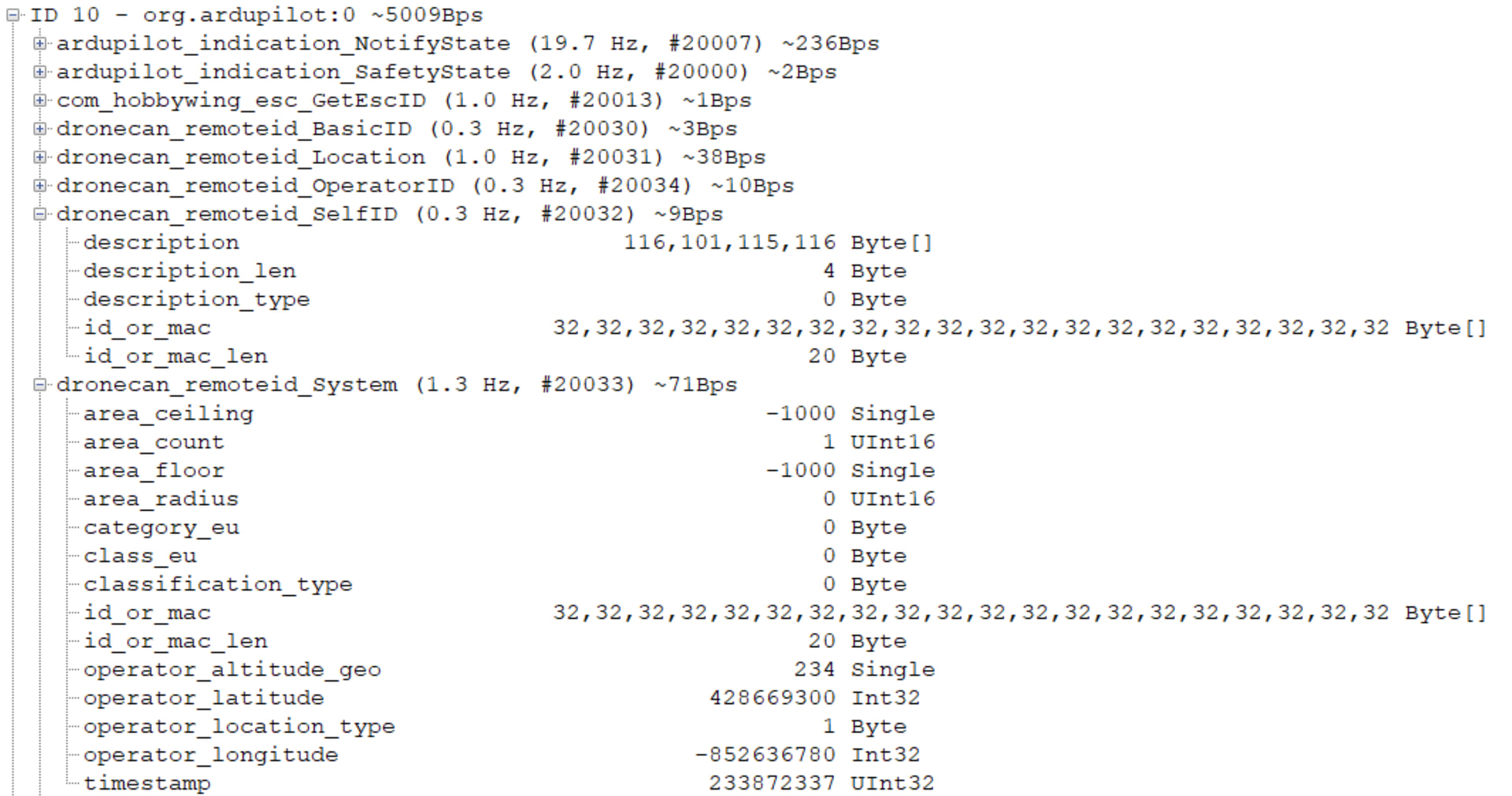
The Here4 Blue is connected via droneCAN, so I used MP’s dronecan inspector to check the data. See screenshots “dronecan DID”. Nothing looked obviously wrong there, although I can only assume what values are acceptable for indicating something is unused.
The message frequencies on DroneCAN are:
BasicID 0.3 Hz
Location 1 Hz
OperatorID 0.3 Hz
SelfID 0.3 Hz
System 1 Hz
(from here4) ArmStatus 1 Hz (in attached zip)

Regarding our custom GPS HEARTBEAT message, I don’t know, but I cut it out of the above testing and will look into that later.
I’ve worked with QGC because it works better on the herelink controller than MP, but frankly, MP has vastly superior debug tools and is my go-to choice for a PC GCS.
Despite all that, DroneScanner still doesn’t pick it up. Just to cover my bases, I tried it on two separate phones and checked the app permissions.

I would have to rebuild our custom software to try a different target system in the mavlink messages. That’s beyond what I’m able to tackle on the weekend. In any case, I would hope that the Here4 Blue would at least work with mission planner…

At this point, I am suspecting that trying a different Here4 on Monday is a good idea. In my opinion, the fact that the droneCAN messages are being sent, and I know that the CAN connection is good because the GPS works, is a strong indicator that it is either A) the message contents or B) a Here4B malfunction.

ODID Saga.zip (3.8 MB)

Update: I also updated my Here4 Blue’s firmware to 1.15.7. No change other than that I had to increase the publishing frequency of my GCS GPS emulator to 5 Hz to get rid of an invalid location status. Still no bluetooth, though.

I also checked cubepilot’s repositories opendroneid-core-c and GNSSPeriph-release and found no clues. opendroneid-core-c’s mav2odid and opendroneid files do contain some basic range checks for incoming values, but when I compare the values, I see no problems.

@Michael_Oborne , @philip , can you chime in? Hopefully I’ve provided enough data you can tell me whether this seems like a me-problem, or a problem with this Here4 Blue?

Hi James-Michael,

Thank you for the detailed follow-up. Based on your Mission Planner screenshots and DroneCAN Inspector data, I agree that this no longer looks like a simple “missing OpenDroneID messages” issue.

From what you posted, the first path appears alive:

GCS / Mission Planner → autopilot → DroneCAN RemoteID messages → Here4 Blue

You are seeing RemoteID OK, RID Comms green, ARM Status green, and DroneCAN RemoteID traffic including BasicID, Location, OperatorID, SelfID, System, and ArmStatus. The important remaining question seems to be the second path:

Here4 Blue → actual BLE / Wi-Fi OpenDroneID broadcast → phone apps such as Drone Scanner / OpenDroneID

ArduPilot’s Mission Planner OpenDroneID page says the Drone ID tab is intended for monitoring Remote ID status, attaching the required GCS GPS/operator location, and setting UAS/operator ID data:

The ArduPilot Remote ID page also notes that Mission Planner should show Remote ID status and pre-arm messages if there are problems:

CubePilot’s Here 4 manual states that Here 4 has a built-in Drone-ID feature and that the Blue version supports Drone-ID:

CubePilot’s CubeID documentation describes CubeID as broadcasting UAV information through Bluetooth 5.2 and supporting CAN/serial protocols:

So if DroneCAN RemoteID traffic is present but the phone apps still detect nothing, I would try to separate the issue into “data path is valid” versus “RF broadcast is actually active.”

A few things I would still verify before concluding hardware failure:

  1. GCS GPS indicator
    In your Mission Planner screenshot the GCS GPS indicator appears yellow, not green. I am not sure whether yellow means “valid enough for display/pre-arm” or “not fully valid for actual broadcast.” Since operator location is part of the OpenDroneID setup path, I would try a known-good real GCS GPS source if possible.

  2. Placeholder values
    I would try replacing any unusual placeholder values with fully normal values, especially:

  • area_ceiling = -1000
  • area_floor = -1000
  • operator_altitude_geo = -1000 or other placeholder values
  • very short test IDs such as “SN012”

Even if the MAVLink/DroneCAN messages appear accepted, the transmitter firmware may have stricter validity checks before enabling BLE/Wi-Fi advertising.

  1. Target system/component
    The MAVLink OpenDroneID service page says that by default OpenDroneID MAVLink messages should use target_system = 0 and target_component = 0 to broadcast to all MAVLink components, unless targeting a specific OpenDroneID component:
    Open Drone ID | MAVLink Guide

You are using target_system = 13 and target_component = 0. Since the data is reaching DroneCAN, this may not be the root cause, but it is still worth testing with 0/0 when convenient.

  1. Confirm whether the RF advertising layer is active
    The key missing diagnostic is: “RemoteID data received, but BLE/Wi-Fi broadcast suppressed” versus “BLE/Wi-Fi broadcast active but phone apps cannot decode it.”

If CubePilot/ArduPilot has any diagnostic message or LED/status condition for that state, it would be very useful.

  1. Swap-test another Here4 Blue
    Your idea to test another Here4 Blue on Monday is probably the fastest isolation step. If the same Mission Planner/DroneCAN setup works with another unit, that would strongly suggest this specific Here4 Blue has a firmware state issue or a hardware/RF broadcast issue.

At this stage, I would not assume the GCS/custom software is the main issue anymore. Your evidence suggests the RemoteID data path is mostly working; the unknown is whether the Here4 Blue is actually enabling and transmitting the final BLE/Wi-Fi broadcast.

Regards,

Dr. Fares Al Dhaheri

Al-Etihad Industrials, UAE

Success! Swapping the unit for a new Here4 Blue worked. The previous one just didn’t function correctly. I will be returning it to the supplier for diagnostics.

The “GCS GPS” indicator in mission planner stayed yellow the entire time, but everything appears to be functioning as intended.

For those that come after, these are the steps I would recommend to troubleshoot a Here4 Blue not being detected in the Drone Scanner or OpenDroneID apps:

  1. Follow the instructions. Dr. Fared’s above post links all the relevant docs.
  2. Trouble shoot the mavlink stream with mission planner > connect > ctrl+f > mavlink inspector. Enable the ground station traffic. Look for the DID messages go to and coming from the drone. The messages to look for are documented on the ODID mavlink page.
  3. Check the CAN bus inspector with setup > optional hardware > connect to your canbus (I used dronecan) > inspect. There should be a CAN bus message for each mavlink message, as CAN is functioning under a mavlink forwarding layer for ODID functions.
  4. If you’re using a GCS that can’t run mission planner well, like a herelink, you can emulate your GCS GPS with a script and use a PC. Refer to my previous post’s zip file “ODID Saga.zip” for “emulator.py”. You may wish to adjust the location and altitude to your location. Connect in mission planner’s DID tab to the TCP host port 14551. Or just ask AI to make you a script, because that’s what I did.
  5. If you’re uncertain about your app functioning, just grab a RID broadcast module instead of a standard RID module. Since they don’t require anything else to function, you just turn it on and your app should pick it up.
  6. Buy more than one of your RID module and swap it.

I also checked the bluetooth transmitter was functioning with a spectrum analyzer. However, if you have one, you probably know what to do with it. The bad unit had no emission.

From what you described, I would separate this into two tests:

  1. First confirm the Here4 Blue / CubeID path using a known-good GCS flow, preferably Mission Planner OpenDroneID panel or QGC, with valid GCS GPS/operator location and UAS/operator ID populated.

  2. Then compare your custom GCS MAVLink output against that known-good flow.

Passing pre-arm checks may not necessarily prove that the module is broadcasting packets visible to OpenDroneID / Drone Scanner. It only shows that ArduPilot is satisfied enough with the configured RID health checks. Since you mentioned it worked with QGC-Herelink when using a fixed GCS location, that points more toward the custom GCS message flow rather than the Here4 Blue hardware itself.

I would specifically verify whether the custom GCS is providing the full expected OpenDroneID data path, including valid live operator/GCS location and the required ODID message set/rates. MAVLink defines Basic ID, Location, System, Operator ID, ARM Status, System Update, and Message Pack messages as part of the OpenDroneID service:

https://mavlink.io/en/services/opendroneid.html

Also, Mission Planner’s OpenDroneID panel documentation is useful because it explains that the panel manages the exchange of GCS/operator information with the RID module via the autopilot:

https://ardupilot.org/planner/docs/opendroneid.html

For troubleshooting, I would temporarily remove hardcoded/static values, use a real or fixed valid GCS GPS source, and log the MAVLink traffic from both QGC/MP and your custom GCS to compare what is actually being sent to the autopilot/RID module.

Dr. Fares Al Dhaheri

Al-Etihad Industrials, UAE

use this one — it covers the core idea best:

https://mavlink.io/en/services/opendroneid.html

you can drop it when explaining that MAVLink/OpenDroneID messa

ges can be valid in the stack, but that doesn’t guarantee the final BLE/Wi-Fi broadcast is actually being emitted.

Our custom GCS works, too. Comparing it against the ODID documentation and MP’s mavlink inspector tells me the custom software is to-spec. This issue is closed. Thanks for the help!

It is definitive that the bad unit is bad. I compared the bad and good Here4 Blue units with the exact same configuration, and used a spectrum analyzer to verify the “bad” unit output no RF energy when the “good unit” did. The good unit was picked up on the apps.