We have lost countless hours so far updating this latest mandatory update to our multiple Here4 pucks. We have multiple ships running dual Here 4 units. Updates have never been an issue before. The first ship we updated went to SW version 1.15.5F1FC167. After updating the node IDs were completely confused along with the compasses. After a lot of time reconfiguring and rebooting, finally success.
I go to update the next ship the next day, those Here 4s update to SW version 1.15.254AAED9. What?? Run into the same problems as first ship, complete confusion. Go back to first ship and check update again on each Here 4, they also update to 1.15.254AAED9.
Go to third ship, exact same problems updating, complete confusion that requires reconfiguring. Those pucks updated to 1.15.254AAED9. Everything was working perfect on third ship on Saturday. Come in today, plug into ship and now compass is missing on CAN1 Here 4! Cannot get it back at all. I use inspector and see that now “MagneticFieldStrength” is missing. For the heck of it I try to update the unit. It performs an update and now SW Version is 1.15.5EC5375E. The second puck updated to that as well. Still compass is missing on Here 4 unit 1.
I’m not sure what to do at this point…this update has wasted an incredible amount of time and now we have a Here 4 with a missing compass. I have no idea what the correct SW Version is supposed to be?? Also, Mission Planner has never notified me one time of an update. We have multiple other ships to update but I’m afraid to do anything to them now. These are ships that have hundreds of hours each, I feel like I’m creating problems with this update. Any ideas?
Brad,
I just updated 3 aircraft with dual Here4s and it took 24 minutes to complete all three of them. No issues. No DroneCAN Node ID issues. No barometer issues. No compass calibration issues.
I’d be interested to know what you did not understand in the instructions. I’m not sure where we could make them clearer because they seem pretty straight forward to me but obviously things did not go well for you.
Please link to your clear instructions that you speak of. The basic instructions I saw in the mandatory update post were what I followed. I’ve never had issues updating them before. Regardless, what is the correct SW Version now? What do I do now about a missing compass? This appears to be the same missing compass issue that others have been dealing with. We’ve never seen this issue until now after this update.
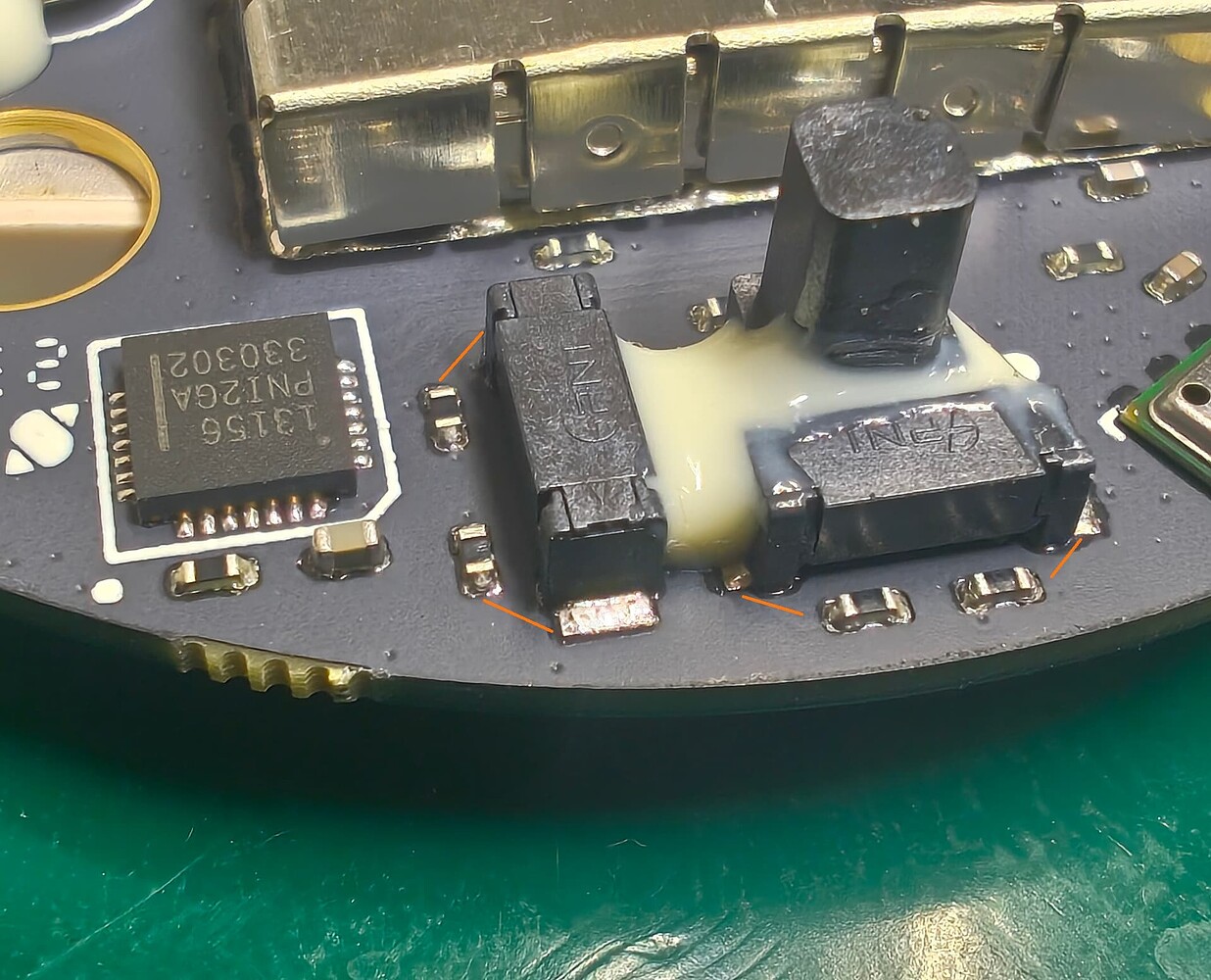
As for the magnetometer, as mentioned earlier , physically measure the resistance of the coils. Coils are those three elements on the right, two (X and Y) horizontally and one vertically (Z).
If the coils in your modules are heavily flooded with resin and you cannot touch the pads directly with the probes, you can take measurements at the ends of the resistors, as these connections are identical. I have marked one of the coils in the photo.
Damaged coils will have high resistance. Working ones are around 30 ohms, if my memory serves me correctly.
I think it is cubepilot that should prepare such instructions for checking and not the community. Especially since the problem has been around for a long time.
Nice, good data that joint is gone electrically.
Which axis has high resistance?
Also the components placement is just poor on this board. I see only one capacitor and no filtering. And bias resistors should be close to device and not coils.
Poor PCB layout actually. Expected better from cubepilot.
Can you measure resistor values of them? Low resistor values can also cause the issue.
The ones near coil should measure 121ohm, one near the IC should measure 33kOhm.
Let me know!
Hello @CraigElder . I follow both steps from Here4 Manual and Github tag release notes. The first time works ok. However, on 3rd boot it doesn’t get sats. Using Drone CAN GUI I always get the message: Running Node with fallback bootloader. I used 1.15.3 and 1.15.2 to downgrade, but I had the same result.
Hello @CraigElder , thanks for answering. Can you please share your Ardupilot firmware version? I am using Arducopter 4.6.2. I am reading similar issues and this topic is mentioned.